

What should an outpatient clinic actually test for EHR integration?
Guidance should render inside the chart the clinician is already in, read existing structured fields instead of asking staff to retype them, and write back without creating duplicate documentation. The HL7 CDS Hooks specification is the standard mechanism for surfacing third-party guidance at defined points in an EHR workflow, and asking a vendor which hooks and FHIR resources they support is a faster fit test than any scripted demo.
Ask the vendor to show, not describe:
- Which CDS Hooks trigger the guidance (patient-view, order-select, order-sign) and what data each one pulls automatically versus what a person has to type.
- Whether the recommendation writes back to the problem list, medication list, or care plan, or whether it lives in a separate portal a clinician has to remember to check.
- What happens after an EHR upgrade. Interface breakage after a vendor patch is one of the most common sources of unplanned cost in a clinical decision support deployment.
cliexa runs on the EHR you already have through cliexaConnect, the module that handles SMART on FHIR, CDS Hooks, HL7 v2, and X12 data exchange, so the reasoning layer reads your existing record instead of asking anyone to build a second one.
How should a small practice judge care plan and guideline customization?
A guideline that cannot be adapted to local protocols, comorbidities, and payer coverage rules will be ignored within a few visits. Static order sets do not account for the patient in front of the clinician, and a needs assessment of community-based physicians across urban and rural clinics found that the capabilities physicians actually valued were the ones that matched their real clinical decision-making, not the ones that matched a vendor’s feature list.
Three governance questions separate a durable rule set from a brittle one:
- Who signs off when a national guideline is adapted to a local formulary or a payer’s coverage policy: IT alone, or the clinicians who will act on the recommendation?
- Can the practice edit a condition-specific pathway without a vendor ticket, and how long does a rule change take to go live?
- Is there a record of why a recommendation fired, tied to the specific lab value, diagnosis, or care gap that triggered it?
That last point is where explainability stops being a nice-to-have. In a peer-reviewed study published in the International Journal of Eating Disorders, cliexaProtocols, the deterministic clinical rules engine that governs guideline logic under cliexa, matched expert clinical decisions in 90.5 percent of cases across 606 pediatric patients treated for anorexia nervosa (AUC-ROC 0.87), with every recommendation traceable to a validated clinical pattern rather than a black box. That is the standard a small practice should hold any vendor to: a recommendation paired with a reason a clinician can check in a few seconds.
What does workflow fit actually look like in a live demo?
A demo tells a buyer almost nothing until someone drives it, so ask the vendor to load a realistic patient and count every click from opening the chart to a documented follow-up order. If reaching guidance requires leaving the EHR or logging into a second system, a small practice will stop using the tool by the third week, regardless of how sound the underlying logic is.
Judge the recommendation itself against three tests a clinician should be able to pass in a few seconds:
- What is being suggested.
- What specific data triggered it (which lab, which diagnosis, which gap in care).
- What to do next, without manual verification against a guideline the tool only cites but does not show.
A usability evaluation of an osteoporosis decision support tool found that the deciding factor was not whether the underlying logic was correct. It was whether the tool matched the clinician’s actual task flow inside a real visit. Watch the ordinary tasks during a demo, not the showcase ones: a follow-up interval, a medication review inside a 15-minute visit, and closing a care gap without retyping the reasoning into the note. That reasoning step, evaluating what the record means and whether the note supports the plan, is what cliexa governs, powered by cliexaAI, the module that models the clinical thinking underneath every recommendation.
How should remote patient monitoring alerts get routed and escalated?
Remote monitoring only earns its place in a clinic when a reading changes what a named person does that week, not when it just generates another dashboard. Connected devices, structured symptom check-ins, and patient-reported updates only have value if they land somewhere a specific human reviews on a defined cadence.
Three operational questions belong in every RPM evaluation:
- Alert routing. Who receives the alert: the ordering physician, an RN care manager, or a shared queue? How is urgency classified, and can the clinic suppress readings that are technically abnormal but clinically expected, so staff are not triaging noise?
- Risk stratification. Does the platform separate a patient on routine follow-up from one trending toward decompensation using trend logic, not a single threshold crossing, and can the clinic adjust that logic per condition without a vendor ticket?
- Escalation. Is there an explicit outreach threshold, a record of who acted and what they did, and a defined handoff, written back into the chart rather than stranded in a vendor portal?
This is where cliexaTrac, the module that governs patient tracking and remote monitoring under cliexa, does its work: classifying urgency against the protocol set for that patient and routing it to a named queue, with the outcome written back so the EHR stays the complete record. Request actual alert volume from a comparable site before signing, not a demo screenshot.
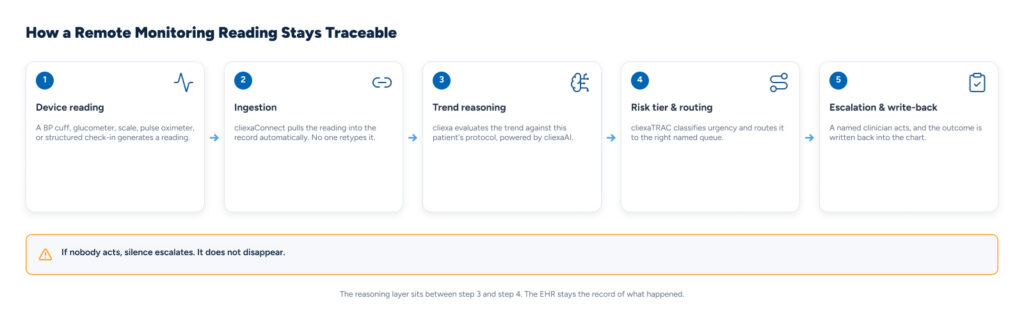
How does a remote monitoring reading stay traceable from device to chart?
A useful way to evaluate any RPM platform is to trace one reading through five decision points and confirm each one is visible, not just the first and last.
- Device reading. A blood pressure cuff, glucometer, scale, pulse oximeter, or a structured patient check-in generates a data point.
- Ingestion. The reading enters the record automatically through the integration layer. No one retypes it.
- Trend reasoning. The reasoning layer evaluates the trend against the protocol set for that patient, not the single reading in isolation.
- Risk tier and routing. The reading is classified by urgency and routed to a named queue: the ordering physician, an RN care manager, or a defined team.
- Escalation and write-back. A named person takes a specific action, and that action is written back into the chart.
If no one acts, the loop should escalate rather than go quiet. Silence is a failure mode, and a clinic should be able to name exactly where in that five-step loop a reading currently sits at any moment.
What actually drives the total cost of clinical decision support?
Licensing is usually the smallest line item; implementation, interface work, training, and ongoing rule maintenance dominate the first two years. Native rule builders inside an EHR and open-source guideline engines can eliminate license fees, and they are genuinely the cheaper option on a spreadsheet. They shift the authoring, testing, and maintenance work onto the practice’s own staff, which is a real cost for a clinic without a dedicated informaticist.
Before shortlisting a vendor, request separate pricing for:
- Interface build and EHR integration.
- Clinician and front-desk training hours.
- Ongoing rule maintenance and re-validation after EHR upgrades.
- Support after go-live, and whether protocol updates are the vendor’s responsibility or the clinic’s.
AHRQ’s own research on community health centers backs this up directly: a multi-site AHRQ-funded study testing high-intensity versus low-intensity implementation support for federally qualified health centers found that a relatively low-intensity, freely available implementation toolkit was often enough to help health centers increase their use of clinical decision support over a short period. Implementation support carries as much weight as software capability where staffing is thin, which is precisely the constraint most outpatient clinics and FQHCs are working under.
What does the evidence actually say about CDS in community-based care?
The trial evidence is genuinely mixed: just over half of computerized decision support systems studied improved processes of care, and the evidence for direct patient outcome improvement is thinner. A systematic review of computerized clinical decision support for chronic disease management, published in Implementation Science in 2011, reviewed 55 randomized controlled trials and found that a small majority of the systems improved care processes, with a smaller share showing measurable improvement in patient outcomes. The same review notes why chronic disease is a favorable target for this kind of support in the first place: it involves recurrent visits, ongoing monitoring, and patient behavior change, which gives a recommendation repeated chances to change what happens next. An isolated interruptive alert has far less to work with.
For a buyer, that translates into a realistic expectation and an unrealistic one. Expect process support: more consistent screening, closed care gaps, tighter guideline adherence. Do not assume a published trial’s outcome improvements will transfer automatically into your clinic. Local implementation quality, EHR fit, and whether the guidance appears at a moment a clinician can act on it are what actually determine whether a benefit shows up. That is also why AHRQ has funded work specifically on integrating decision support into real clinical workflow, including how community health centers meet electronic health record meaningful-use decision support objectives; the difficulty lives in the daily choreography of a visit, not in the underlying rule logic.
The bottom line
Clinical decision support earns its place in an outpatient clinic on four things: it renders inside the EHR you already run, its guideline logic can be governed by your own clinicians, remote monitoring alerts route to a named person on a defined cadence, and the total cost is priced honestly across implementation and maintenance, not just the license line. cliexa governs that reasoning layer, powered by cliexaConnect for integration, cliexaProtocols for guideline governance, cliexaTrac for remote monitoring triage, and cliexaAI for the reasoning underneath each recommendation, while your EHR stays exactly where it is: the system of record.
See how cliexa cuts clinician admin work without replacing your stack.
Your clinic already runs an EHR, a care team, and a set of workflows that work well enough to keep the doors open. cliexa is built to reason inside that setup, not replace it, so a rollout does not mean asking staff to learn a second system.
Frequently Asked Questions
What is the difference between an EHR alert and clinical decision support?
An EHR alert is a single trigger, usually a threshold crossing on one value. Clinical decision support is broader: it can include order sets, risk scores, and guideline-based recommendations that draw on multiple data points and explain the reasoning behind a suggestion. The reasoning step is what turns a raw alert into something a clinician can act on with confidence. See how the reasoning layer works.
Is open-source clinical decision support a realistic option for a small clinic or FQHC?
It can be, if the practice already has staff who can maintain terminology mappings and rule logic over time. Open-source engines shift cost from license fees to internal engineering and on-call support. Practices without a dedicated informatics team generally do better with a supported product where a vendor owns content updates and uptime. Compare the total cost of ownership.
Should clinical decision support replace an existing EHR?
No. Clinical decision support is meant to deliver timely information at the point of care inside the workflow a clinician already uses, not to become a second system of record. How cliexa runs alongside an existing EHR.
How do you avoid alert fatigue from remote patient monitoring?
Ask for the risk-stratification logic behind each alert tier, who receives each tier, and what happens if nobody acts on it. A well-designed system escalates an unaddressed alert; it does not let it disappear. See how remote monitoring alerts are routed and escalated.
What should a clinic ask about training and ongoing maintenance before signing a CDS contract?
Request the specific EHR versions already in production, who configures alerts after go-live, how many training hours are included, and whether protocol updates after a guideline change are the vendor’s responsibility or the clinic’s. Talk through implementation and maintenance.